
How to Turn a Brain Dump into a Daily Plan: 15 Tasks to 6
Turn a messy brain dump into a daily plan you can finish. A worked example: 15 tasks, honest estimates, 6 for today and a home for the other 9.
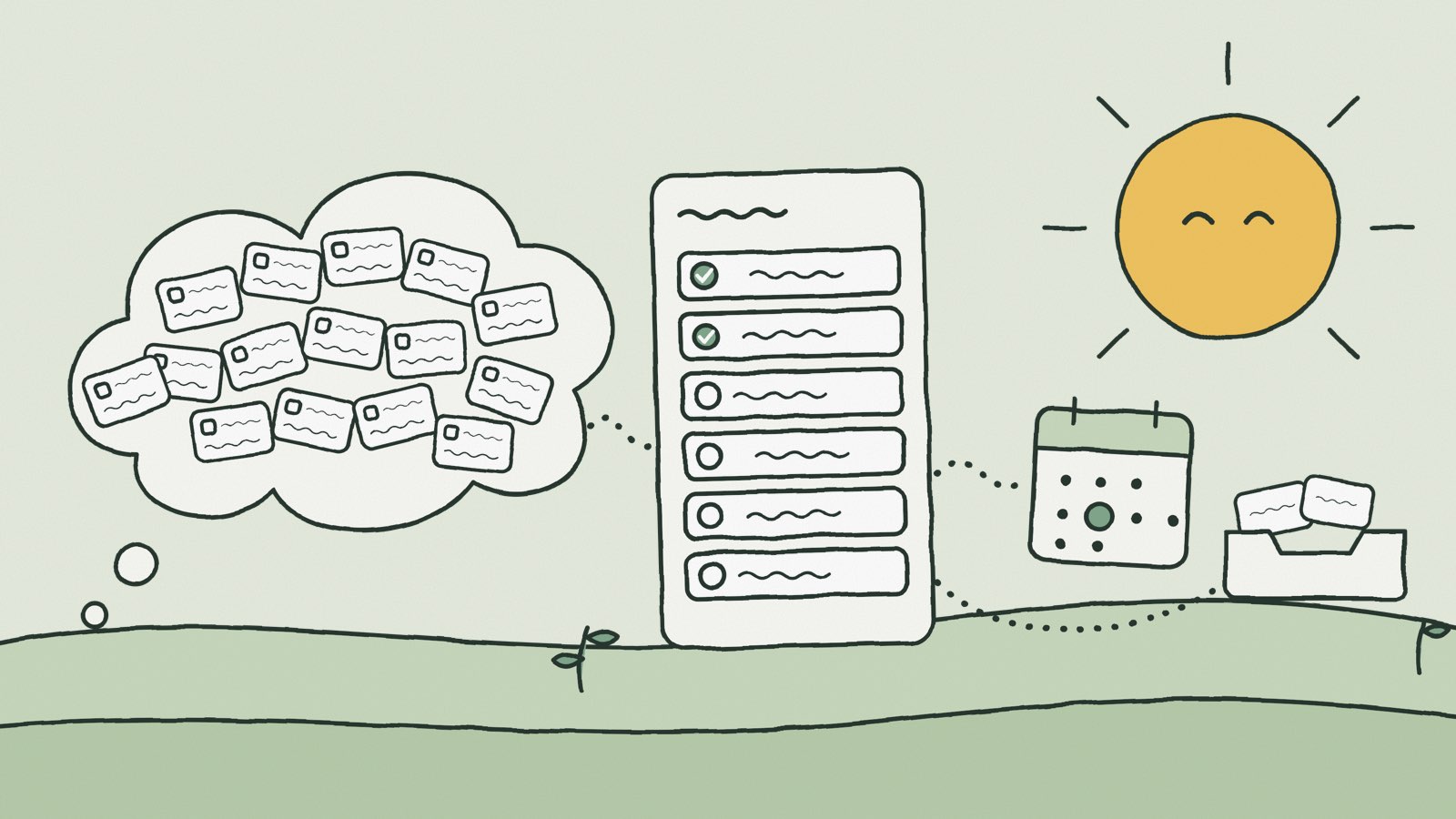
To turn a brain dump into a daily plan, write everything down first, then make three decisions about each item: what is the next action, how long will it really take, and does it belong to today? Add up today’s estimates, compare the total with the time you actually have, and give everything that doesn’t fit a definite place: a later work date, a deadline, or the Inbox.
A brain dump (sometimes called a mind dump) empties your head onto paper. It doesn’t tell you what to do this morning. The to-do list you end up with mixes ten-minute errands with two-day projects, real deadlines with vague wishes, and tasks you can’t start yet with tasks only you can finish. Treat that list as today’s plan and the day is lost before it begins.
Below is a complete worked example: fifteen tasks from one Tuesday’s brain dump, sorted down to six for today, with estimates, a timetable and a home for each of the other nine. The same steps work on paper, in a notes app or in a planner.
The short version
- Dump everything onto one list without sorting it.
- Take out duplicates, notes, worries and other people’s jobs.
- Rewrite each item as a next action you could start.
- Estimate each action from start to finish.
- Work out how much time today really has.
- Choose tasks for today until that time runs out, and leave some unclaimed.
- Give every other task a work date, a deadline or a place in the Inbox.
1. Do a brain dump: everything onto one list
Set a timer for ten minutes and write down everything on your mind: work, errands, promises, things you’re afraid of forgetting. One item per line. Don’t sort, estimate or judge anything yet. Stopping to decide whether each thing matters is exactly what keeps a brain dump half-finished.
Here is the example, written the way it came out on a Tuesday morning:
- Q4 budget slides
- Marta, contract
- Dentist
- Checkout bug
- Team offsite
- Passport
- Emails
- Sam’s report
- Dad’s birthday present
- Pricing research
- Bank card fee
- Shared drive is a mess
- Client workshop next Tuesday
- Expenses
- Learn the new analytics tool
- Email Marta back
- Office Wi-Fi password is on the router
- Am I behind on the Q4 numbers?
- Book a venue for the offsite
Nineteen lines. A few aren’t tasks at all, and many of the rest aren’t ready to plan: “Team offsite” is a project, and “Passport” is a worry with a noun attached. That’s fine at this stage. The goal was to get everything out of your head and onto one list you trust.
2. Take out what isn’t a task
Not every line in a brain dump is something to do. Before planning anything, go through the list once and pull out four kinds of line:
- Duplicates. Merge them. “Email Marta back” is the same job as “Marta, contract”.
- Reference. Information worth keeping that needs no action. Store it where you’ll look for it, such as a note on a related task or a shared document. “Office Wi-Fi password is on the router” is not a task.
- Worries. Ask whether an action sits behind it. “Am I behind on the Q4 numbers?” is answered by drafting the budget slides, so it folds into that task. If no action helps, writing the worry down was the point; cross it off.
- Someone else’s job. Hand it over now and keep, at most, a reminder to check on it. Priya organizes team events, so “Book a venue for the offsite” goes to her in a one-line message.
Tasks you can’t start yet stay on the list, with a note of what you’re waiting for. They are real work, just not candidates for today. In the example, four lines go and fifteen remain, all of them things you will do yourself.
3. Turn each line into a next action
Go through the list once and rewrite each item as its first concrete step, starting with a verb. “Q4 budget slides” becomes “Draft the Q4 budget slides.” “Passport” becomes “Fill in the passport renewal form.” If you can’t name a first step, the item is too vague to plan, and working out that step is the real next action.
While you’re there, note two facts beside each item: whether a date is attached to it, and whether someone is waiting on you. Both matter when you choose what goes into today.
4. Estimate each task from start to finish
Write a rough duration for every action, including the time to get started and to wrap up. Familiar lengths are enough: 10, 15, 20, 30, 45, 60 or 90 minutes. For something unfamiliar, estimate a first block of investigation rather than the whole job. “Investigate the checkout error and write down the next step” is a task you can size; “fix the checkout bug” may not be.
Here are the fifteen tasks after steps 3 and 4. The estimates are illustrations, not benchmarks for how fast anyone should work.
| # | Next action | Estimate | Date or dependency |
|---|---|---|---|
| 1 | Draft the Q4 budget slides | 150 min | Due Thursday |
| 2 | Reply to Marta with the two contract changes | 20 min | Marta is waiting |
| 3 | Call the dentist to book a check-up | 10 min | Office hours only |
| 4 | Investigate the checkout error and note the next step | 60 min | Customers affected |
| 5 | Propose three dates for the team offsite | 30 min | — |
| 6 | Fill in the passport renewal form | 40 min | Trip in March |
| 7 | Answer emails | 30 min | — |
| 8 | Review Sam’s draft report | 45 min | Sam needs it Wednesday |
| 9 | Order Dad’s birthday present | 20 min | Party on Saturday |
| 10 | Read the pricing research | 60 min | — |
| 11 | Call the bank about the card fee | 15 min | Office hours only |
| 12 | Tidy the shared drive | 90 min | — |
| 13 | Prepare next Tuesday’s client workshop | 90 min | Workshop next Tuesday |
| 14 | Submit expense receipts | 30 min | Due 31 October |
| 15 | Try the new analytics tool on one report | 60 min | — |
| Total | 750 min |
That is twelve and a half hours of work. Even before you look at the calendar, it is clearly not one day.
5. Work out how much time today really has
The example day runs from 09:00 to 17:00: 480 minutes. Three things are already fixed: a 15-minute stand-up, a 30-minute lunch and a 45-minute client call, 90 minutes in all. Keep another 45 minutes for breaks and the interruptions that always arrive. That leaves 345 minutes for tasks, a little under six hours.
Will this brain dump fit?6 h 45 min over Check your own list in the free calculator →750 minutes of tasks against 345 available puts the list 405 minutes over, close to seven hours. No amount of focus closes that gap. The question isn’t how to do everything today, but which work earns today’s time.
6. Prioritize: choose today’s tasks
Go down the list and give a task a place today only if at least one of these is true:
- Its deadline needs today’s work. The budget slides are due Thursday, take two and a half hours, and should leave time for someone to check the numbers.
- Someone is waiting on you. Marta can’t send the contract, and Sam can’t finish the report, until you reply.
- Waiting makes things worse. Customers are running into the checkout error now.
- It’s small and keeps coming back. Emails pile up, and the dentist call has been on every list for weeks. Ten minutes ends it.
Add tasks in order of importance and stop before the total reaches your limit.
| Today | Estimate |
|---|---|
| Draft the Q4 budget slides | 150 min |
| Investigate the checkout error and note the next step | 60 min |
| Review Sam’s draft report | 45 min |
| Answer emails | 30 min |
| Reply to Marta with the two contract changes | 20 min |
| Call the dentist to book a check-up | 10 min |
| Total | 315 min |
Six tasks, 315 minutes, with 30 minutes to spare beyond the buffer. It’s tempting to fill that half hour with the bank call. Leave it open: the checkout investigation is the task most likely to run long, and an unclaimed half hour is what lets the plan survive that. If the day goes smoothly, the bank call is an easy thing to pull forward at the end of it.
Six is the result of this example, not a rule. A day of short admin jobs might hold twelve tasks; a day with a long workshop might hold two. Let the time decide the number.
7. Schedule the rest: work dates, deadlines and the Inbox
The other nine tasks need a home too. This is the step most brain dumps skip, and it’s why the same fifteen items come back tomorrow. Every task that isn’t for today needs one of three answers.
A later work date is the day you plan to do the task. Choose it from the task’s own constraints: office hours, other people, what that day already holds.
A deadline is the date by which the task must be finished. Add one only when something real happens on that date: a payment falls due, a person needs the result, an event takes place. Invented deadlines are noise, and they teach you to ignore the real ones.
The Inbox holds tasks you haven’t decided about yet. Leaving something there is not a failure. It’s a holding area you look through regularly, perhaps once a week, and then schedule, keep or delete from.
| Task | Work date | Deadline | Why |
|---|---|---|---|
| Call the bank about the card fee | Wednesday | — | Short, can wait a day, office hours only |
| Order Dad’s birthday present | Wednesday | Thursday | Last day to order for delivery before Saturday’s party |
| Prepare next Tuesday’s client workshop | Friday | Monday | Needs one long block, finished before the workshop |
| Submit expense receipts | Friday | 31 October | Batched with other Friday admin |
| Propose three dates for the team offsite | Next Monday | — | Nothing depends on it this week |
| Fill in the passport renewal form | Next Monday | — | The trip is months away; a deadline would be invented |
| Read the pricing research | Inbox | — | Useful, not yet urgent |
| Tidy the shared drive | Inbox | — | Nothing gets worse if it waits |
| Try the new analytics tool on one report | Inbox | — | Revisit at the weekly review; delete it if nothing has changed |
Notice that the workshop preparation has a work date three days before its deadline, and the passport form has a work date and no deadline at all. Keeping the two apart is what stops a deadline from turning into a scramble: the day you’ll do the work is in your plan well before the day it must be done.
Now check the days you’ve just filled. Wednesday gains 35 minutes of new work, Friday 120 and next Monday 70. None of them has been overloaded to make today fit. Whenever you give a task a date, glance at what that day already holds.
8. Time-block today’s plan
With six tasks chosen, place them around the fixed commitments. Give the main task the stretch where you concentrate best, and use the short gaps for the short tasks.
| Time | Plan |
|---|---|
| 09:00–09:15 | Stand-up |
| 09:15–10:15 | Investigate the checkout error |
| 10:15–10:30 | Break |
| 10:30–13:00 | Q4 budget slides |
| 13:00–13:30 | Lunch |
| 13:30–14:15 | Review Sam’s report |
| 14:15–14:30 | Break |
| 14:30–15:15 | Client call |
| 15:15–15:35 | Reply to Marta |
| 15:35–15:45 | Call the dentist |
| 15:45–16:15 | Emails |
| 16:15–17:00 | Unclaimed: the rest of the buffer and the spare half hour |
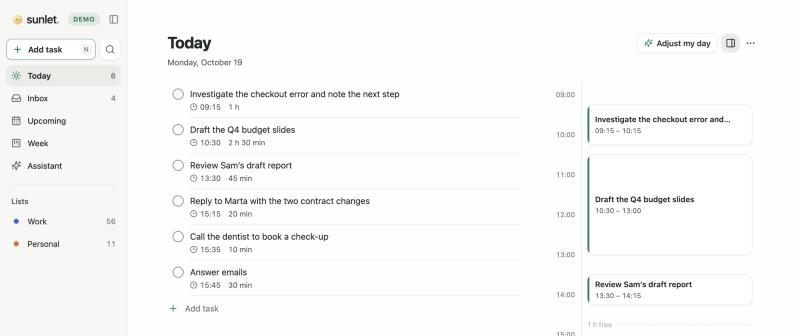
The checkout investigation goes first because what it uncovers could change the rest of the day. If it does, you find out at 10:15 rather than at 16:00, with time left to rearrange. For more on time blocking, and on what to do when a plan falls apart, see How to plan your day.
Turning a brain dump into a plan in Sunlet
All of this works with a pen. If you’d rather have an app do the adding up, this is the routine Sunlet is built around:
- Dump into Quick Add. Type each task the way you’d say it. Phrases like “Friday” or “for 45 min” set the date and duration as you type, and anything without a date waits in the Inbox.
- Sort the Inbox. Send a task to Today or Tomorrow with one click (or press T or M), or ask the Assistant to suggest days and lists for everything waiting there. Nothing changes until you confirm.
- See the time. Every task shows its estimate, the timeline beside Today shows the free time between blocks, and Week adds up how much you’ve planned.
- Keep work dates and deadlines apart. A task can have both: the day you’ll do it and the day it’s due.
If your list already lives in Todoist, TickTick, Things or Apple Reminders, Settings → Import tasks brings it across so you can sort everything in one place. See all features or try the demo with sample tasks.
Brain dump to daily plan: a checklist
- Dump everything onto one list, one item per line, without sorting.
- Merge duplicates, store reference notes, settle worries and hand off other people’s work.
- Rewrite each item as a next action that starts with a verb.
- Estimate each action from start to finish, including setup.
- Subtract fixed commitments and a buffer from today’s hours.
- Choose today’s tasks until the total reaches that limit; leave some time unclaimed.
- Give every other task a work date, a real deadline or a place in the Inbox.
Common questions
What is a brain dump?
A brain dump is a quick exercise where you write down every task, idea and worry on your mind, without sorting or judging them. It clears your head and gives you one complete list. The planning starts afterwards, when you decide what each item is, how long it takes and when to do it.
How often should I do a brain dump?
Whenever your head feels crowded, and as part of a weekly review. The dump itself takes about ten minutes. Sorting takes longer the first time and gets quicker once most tasks already have a home. A short dump before planning each morning works too.
Why six tasks? Is that a rule?
No. Six is what fitted the 345 minutes in this example. The number comes from comparing estimates with the time available, so it changes from day to day. The Ivy Lee method also uses six, but what makes it work is the limit and the order, not the exact number.
What should I do with tasks that sit in the Inbox for weeks?
Look at them during your weekly review and choose: give the task a date, rewrite it as a smaller next action, or delete it. A task that keeps getting skipped is usually telling you it isn’t a priority, or that its first step still isn’t clear.
Should every task have a deadline?
No. Add a deadline only when a real consequence is attached to the date. Most tasks need a work date, or nothing at all yet. When everything has a deadline, the ones that matter stop standing out.